

How to Open a Shopify Store in Pakistan (Complete 2026 Guide)
Shopify is available and fully usable in Pakistan. You can create a store, add products, accept local payments, and sell nationwide or internationally today. The main limitation is that Shopify Payments is not supported for Pakistani merchants, so you will use Cash on Delivery (COD), bank transfer, or third-party gateways such as UnumPay, Safepay, or PayFast. With roughly 45,000–50,000 active Shopify stores already operating in Pakistan, the platform continues to grow. This complete 2026 guide covers requirements, step-by-step setup, real costs, payment options, shipping, legal basics, and a pre-launch checklist.
Is Shopify Available in Pakistan?
Yes. Pakistani entrepreneurs can sign up, build a store, and sell products exactly like merchants elsewhere. Shopify handles hosting, security, and infrastructure. The only significant restriction is the absence of Shopify Payments. Most successful Pakistani Shopify stores run primarily on COD plus one or more digital payment options.
Why Shopify Stores Are Growing Fast in Pakistan
- Fast setup with no coding required and professional mobile-first themes.
- Built-in hosting, SSL, and reliability.
- Strong fit for fashion, beauty, home décor, dropshipping, and imported products.
- Full brand and customer-data ownership.
What You Need Before Opening a Shopify Store
- A clear product niche with real demand and healthy margins.
- A professional email address.
- A debit/credit card that can handle USD billing for the Shopify subscription.
- A custom domain name.
Optional at the start but recommended later: NTN registration with FBR.
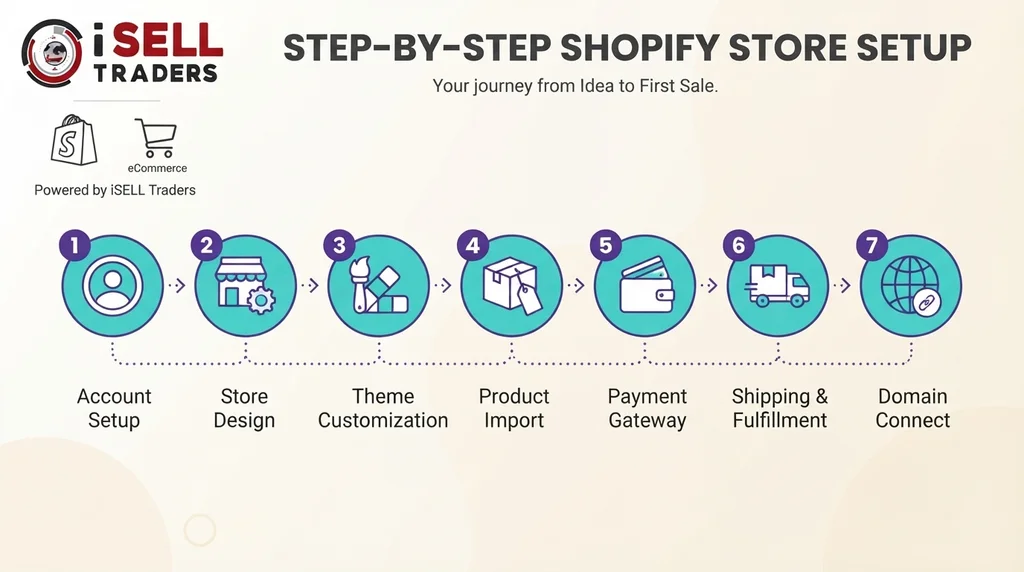
How to Create a Shopify Store, Step by Step
- Create your account — Sign up on the official Shopify website with your email and password.
- Set store details — Enter business information and set currency to PKR.
- Choose a theme — Pick a fast-loading, mobile-optimized free theme (Dawn, Refresh, or Sense).
- Add your products — Use clear titles, unique descriptions, prices in PKR, and high-quality images.
- Set up payment methods — Enable COD and add a third-party gateway.
- Set up shipping — Connect major Pakistani couriers via apps.
- Connect your domain and customize policies.
- Place a test order and walk through the full process.
Shopify Store Costs in Pakistan (2026)
| Plan | Approx. Monthly (USD) | Best For | Third-Party Fee |
|---|---|---|---|
| Starter | ~$5 | Social selling only | Higher |
| Basic | $29–39 | Most new full stores | 2% |
| Grow | $65–105 | Growing stores | 1% |
| Advanced | $299–399 | High-volume stores | 0.6% |
Additional costs include domain, optional apps, and marketing. Always verify current pricing on the official Shopify site.
Payment Options for Shopify in Pakistan
- Cash on Delivery (COD): Still the most popular. Set as a manual payment method. No Shopify third-party fee.
- UnumPay: Popular Shopify app connecting JazzCash, Easypaisa, and local bank cards (low fee + Shopify’s third-party fee).
- Safepay: Strong onsite checkout and Raast support.
- PayFast and other third-party options.
- Bank transfer as a manual method.
Test one real transaction and refund before going live.
Shipping and Logistics
Connect local couriers (TCS, Leopards, BlueEx, PostEx, M&P, etc.) through Shopify apps. Require a phone number at checkout and set clear delivery times. For more details on e-commerce logistics in Pakistan, see our Logistics Services for E-Commerce in Pakistan guide.
Shopify Pros and Cons for Pakistani Sellers
Pros: Fast beginner setup, professional mobile designs, included hosting and security, full brand control.
Cons: Ongoing USD subscription costs, no native Shopify Payments, third-party fees on digital payments.
Shopify vs WooCommerce vs Daraz in Pakistan
Shopify is easiest for beginners. WooCommerce offers more customization and SEO control. Daraz gives instant access to an audience but less brand control. Many sellers use more than one channel.
Marketing Your Shopify Store
Combine SEO, Facebook/Instagram/TikTok ads, WhatsApp support, and email marketing. Consistent branding and good product photos build trust. If you plan to source products, our guides on importing from China and dropshipping in Pakistan will help.
Common Mistakes Beginners Make
- Launching without testing a full order (including COD settlement).
- Using only supplier photos or thin descriptions.
- Ignoring mobile speed and checkout friction.
- Skipping clear policies and COD instructions.
Pre-Launch Checklist
| Area | Done When |
|---|---|
| Plan & Billing | Basic plan active, USD card works |
| Payments | COD enabled + one tested digital option |
| Courier | Account open and app booking a test parcel |
| Checkout | Phone required, Pakistan zones & rates set |
| Policies | Return, shipping, and contact pages customized |
| Domain & Theme | Own domain connected, mobile pages fast |
| Products | Real photos, PKR prices, delivery notes |
| Test Order | One order shipped, delivered, and settled |
FAQ
Does Shopify work in Pakistan?
Yes. Full functionality is available. The main adjustment is using COD or third-party gateways instead of Shopify Payments.
How much does it cost to start a Shopify store in Pakistan?
The Basic plan is typically $29–39 per month. Add domain, optional apps, and marketing. Many beginners start with a first-month budget in the PKR 15,000–40,000 range.
Can I use Shopify for dropshipping in Pakistan?
Yes. It is one of the most common platforms for Pakistani dropshippers.
Do I need business registration or NTN to start?
Not strictly required on day one, but highly recommended for tax compliance and scaling.
Final Thoughts
Shopify is a practical option for Pakistani sellers in 2026. Success comes from choosing the right products, setting up payments and shipping that match local buyer behavior, testing thoroughly, and combining SEO with paid marketing.
Related guides on iSell Traders: Daraz seller account, dropshipping in Pakistan, and importing products from China.


Very Helpful for a beginner like me indeed.
This helps alot. THanks